

Review your League games, one death at a time
Where you died, what happened just before, and the one thing you will do differently next game.
What it does
After a game, LazyElo's Review page puts each of your deaths on the map. Open one and you see who killed you, where the damage came from, your vision, gold and level, where their jungler was and what happened in the minute before. Three short questions make you think it through, and one click turns a death into an if-then plan for Focus.
The Numbers and AI tab compares the game with your own average on that champion. The AI coach in Insights looks at all your games at once and gives you five points to work on.
Review, step by step
Pick a game
The Review page lists your stored games, with filters for queue and champion. Each one says whether you won and whether you have reviewed it already.See your deaths on the map
Each death is a numbered dot on the minimap, colored by kind: solo, gank, skirmish or teamfight. Click a dot or a line in the list to open that death.Read what led up to it
Who killed you and who helped. Where the damage came from. What happened in the minute before: your kills and assists, teammates or enemies dying, objectives, towers, a trip to the shop. Where their jungler was, according to the timeline. The wards you placed in the 2 minutes before. Your gold and level against your killer's. And whether your team got anything back within 15 seconds.Answer three questions
Short answers, for yourself. They save right away.
- What did you know about the enemy jungler at that moment?
- Did you have vision?
- What could you have done differently?
Turn it into an if-then plan
When a death fits a pattern Focus can measure, such as being ganked without a ward in the 2 minutes before or dying with 1,100+ gold in your pocket, LazyElo says how often that happened in your recent games in that role and which number Focus will track. You edit the if-then sentence, in your own words if you like, and send it to Focus.Check the numbers
Under Numbers and AI: the game against your own average on that champion. CS per minute, CS at 10 minutes, gold and damage per minute, your share of your team's damage, kill participation, vision per minute, deaths and time dead. Then vision, ganks and roams: your longest time without a ward, your wards before 14 minutes, how often you were ganked without a ward, and your roams with what your lane lost meanwhile. One click asks the AI what could have gone better.
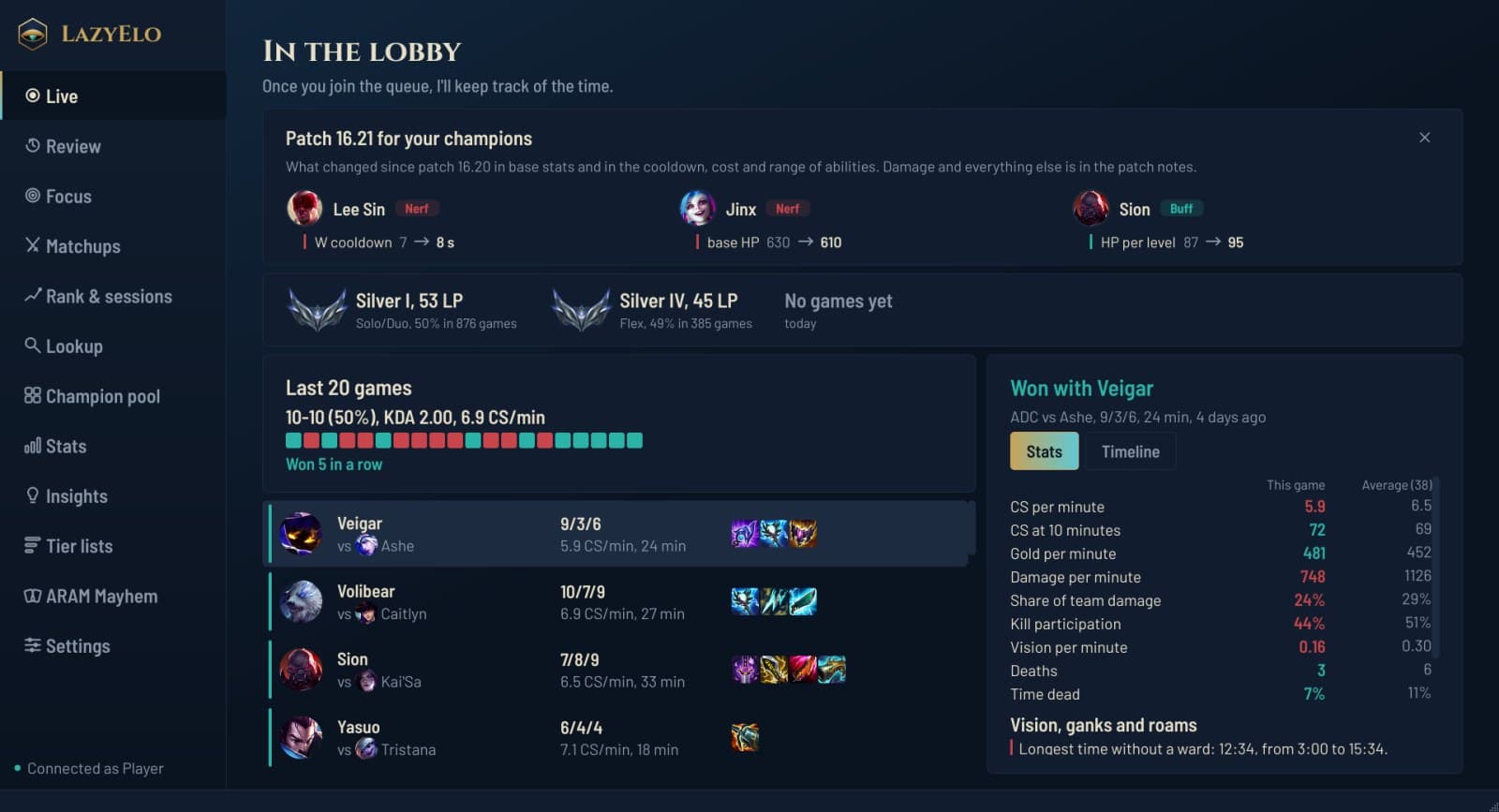
One game against your own average on that champion, here in the lobby. The Review page shows the same panel under Numbers and AI.
Focus: one plan per role, measured for 15 games
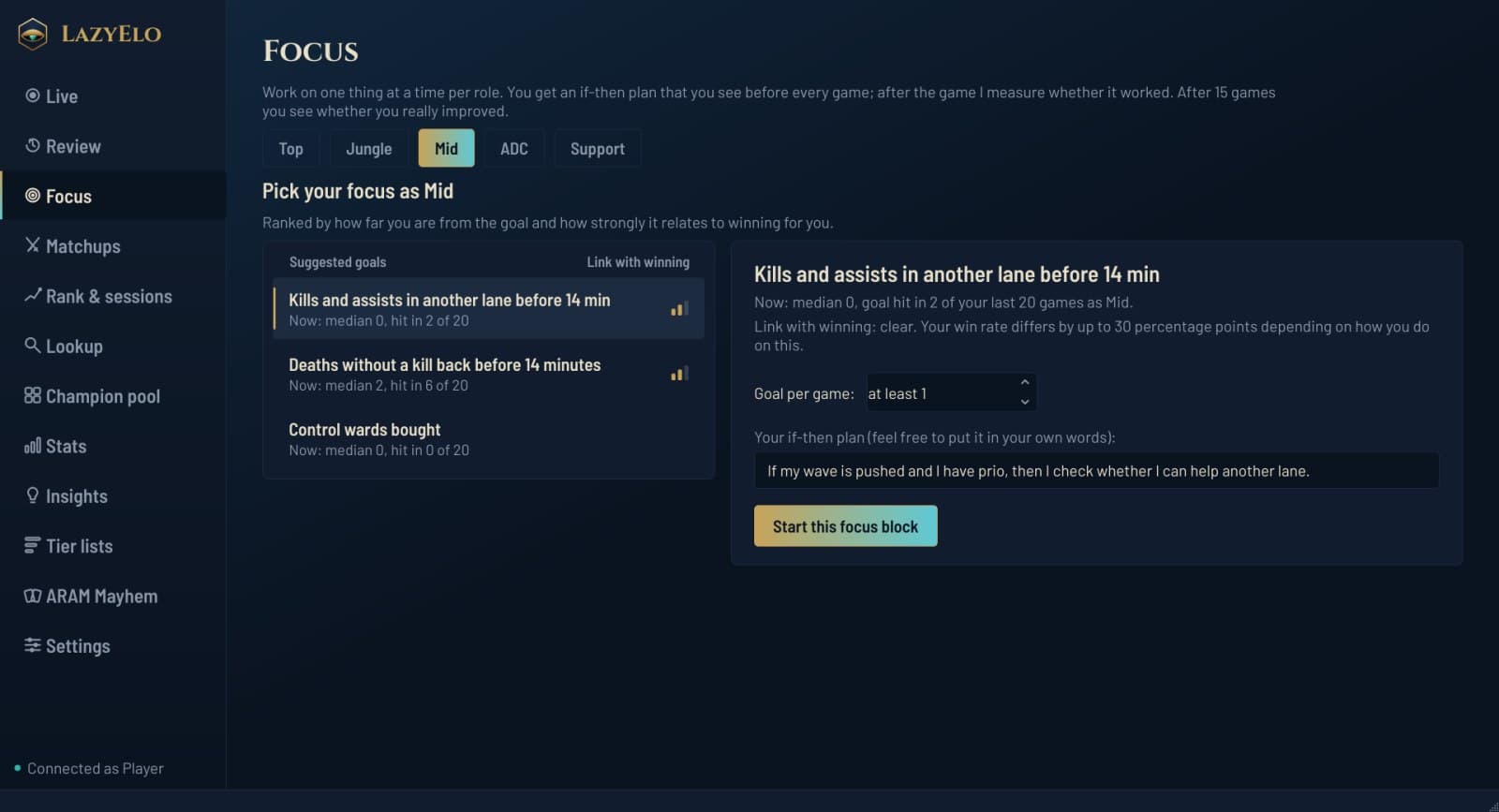
Goals that matter for you
Suggested goals, ranked by how far you are from the goal and how strongly it goes with winning in your own games. Each shows your median and how often you hit it in your last 20 games in that role.The plan in front of you
Your if-then plan shows before every game: in champ select, on the Live page and in the overlay's corner list.A check after every game
Your number, hit or not, and one quick question: did you carry out the plan (yes, partly, no)? On a no, it asks what got in the way: a gank, a trade, tilt, you forgot, or something else.An honest verdict after 15 games
It only calls a block a success when your hit rate rose clearly and more than a number you didn't train, because your weakest number tends to improve by itself. Then you keep the goal as maintenance, extend by 10 games or stop.
The AI coach in Insights
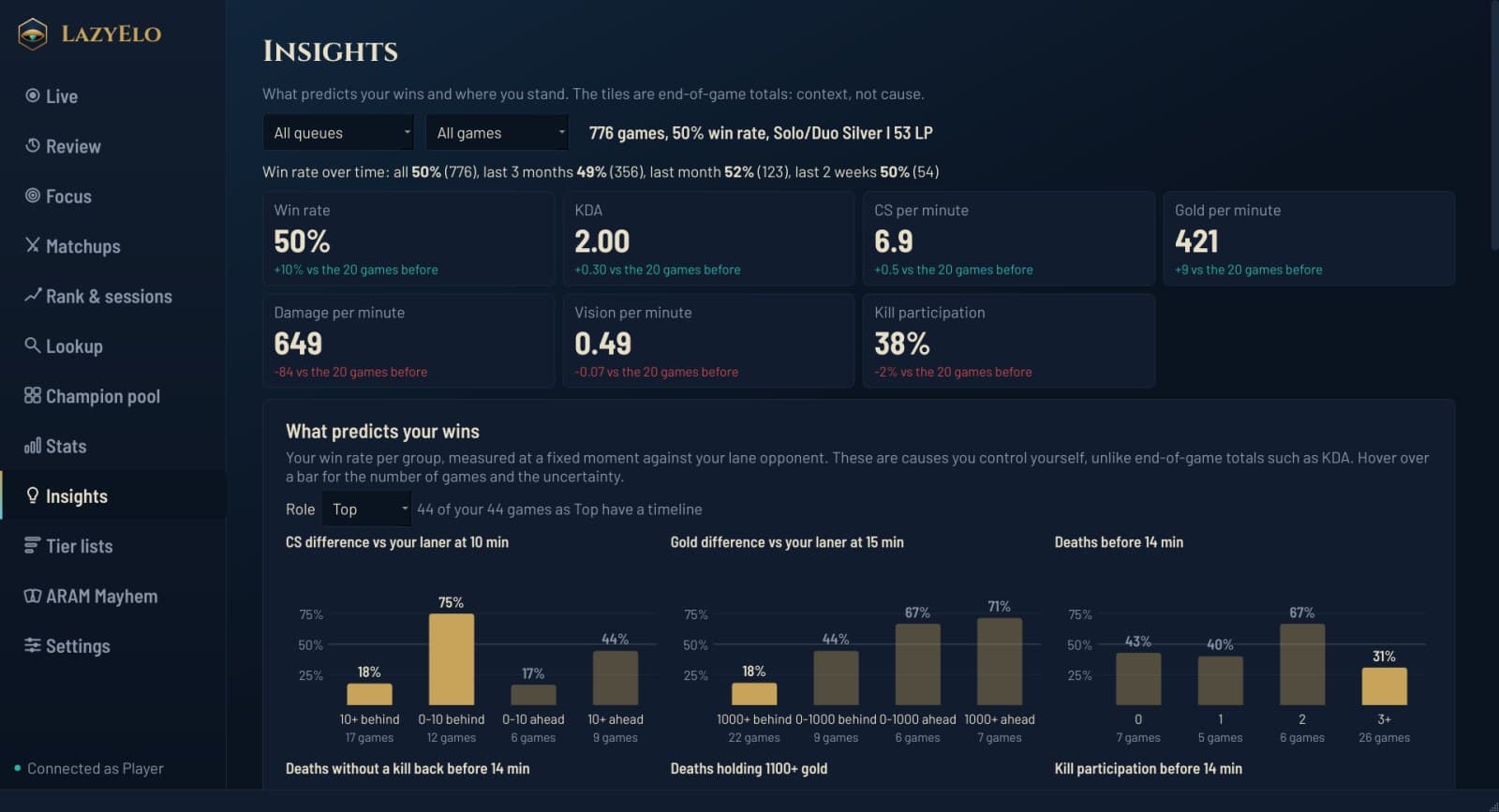
What predicts your wins
Without AI: your win rate by things you control, such as your CS difference with your lane opponent at 10 minutes, your gold difference at 15 and your deaths before 14 minutes, with the number of games behind each bar.Trends and sessions
Your win rate over time, per game within a session and per game length.What kills you
The champions and abilities that did the most damage at your deaths in your last 20 games.Who you play with
The players you queue with most, and which champions work best together.
AI is included in Pro (300 analyses a month), or works on Plus with your own Anthropic or OpenAI key. It answers in the app's language, English or Dutch, and works after the game, never during it. What it sends and where is on the privacy page.
Who it's for
Players who die and don't know why
Each death comes with its context, so you see the pattern instead of guessing.Players who won't watch a full replay
A review is a few deaths and three questions each, not thirty minutes of video.Players who want one thing to work on
A death becomes one if-then plan, and Focus tells you after 15 games whether it worked.Not for you if
you want clips of your plays. LazyElo doesn't record video.
The guide How to climb in League explains why one goal and one moment at a time works, and the CS per minute and vision score guides give benchmarks for the numbers above.
The loop between games
Four pages in the app that feed each other. A death in Review becomes a plan in Focus, your plan per opponent waits in Matchups, and Rank & sessions shows whether your LP moves. Then the next game goes back to Review.
Step 1
Review (this page)
Each death on the map, three questions, one plan.
Step 2
Focus (this page)
One if-then plan per role, measured for 15 games.
Step 3
MatchupsYour own plan per opponent, asked in champ select.
Step 4, then back to 1
Rank & sessionsYour LP per game and per session.
Questions and answers
How do I review my own League games?
Is there an AI coach for League of Legends?
Do I need replays or video?
How long does a Focus block take?
Is the game review free?
Review your next loss in a few minutes
Install LazyElo and play a game. Your games and their timelines come in after each game, and the Review page shows your deaths on the map.
Free plan, no ads. For Windows 10 and 11.
Related
- Are LoL apps safe?
Overwolf, Porofessor, Blitz and Riot's 2026 rules.
- Best LoL overlay
In-game overlays compared, with and without Overwolf.
- OP.GG alternative
Stats sites, and the OP.GG desktop app next to LazyElo.
- Champ select helper
Picks from your own pool, and your matchup notes.
- LP tracker
Your LP per game and per session, from day one.
- How to climb in League
Set one process goal; review one moment.
- How to stop tilting
Session rules and breaks.
- All features
What LazyElo does before, during and after a game.
- Compare League apps
LazyElo next to Porofessor, Mobalytics, Blitz and U.GG.