

Champ select advice from your own pool
The best champion you play for this draft, with the reasons, and your own plan for the lane before you lock in.
What it does
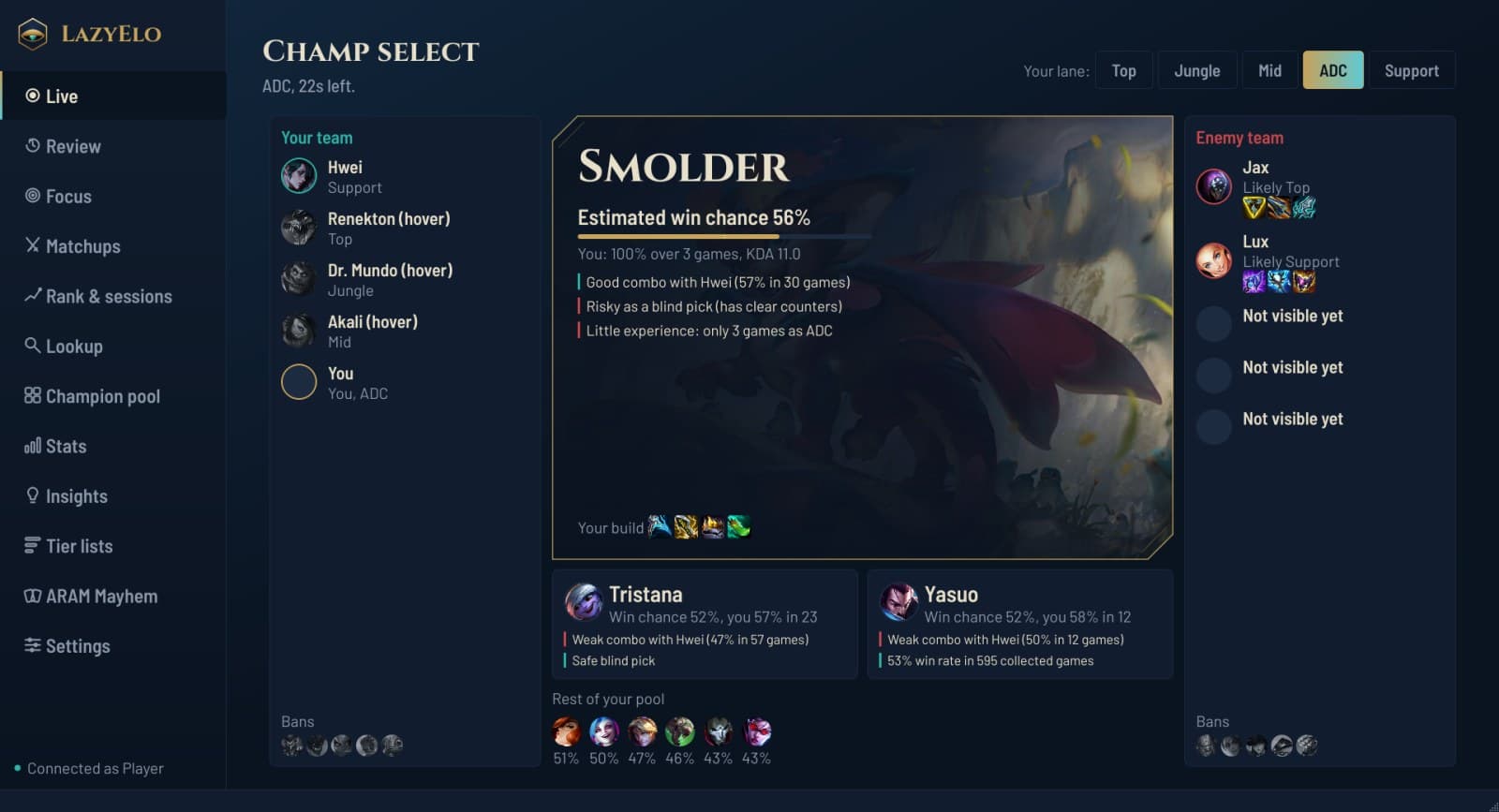
LazyElo follows champ select in the League client. For your lane it scores every champion in your own pool against this draft and puts the best one on top, with an estimated win chance and the reasons: your win rate on it, how it does into the enemies you can see, how it fits your team and whether it's a safe blind pick.
Once it can tell who your lane opponent is, it asks for your plan against them first, and only then shows the notes you wrote earlier. You pick and lock in yourself.
How it works, step by step
Fill your pool
On the Champion pool page you choose the champions you like to play in each lane: at least 10, and more is fine. The advice only ever comes from this list. If a lane is still empty after your first sync, LazyElo fills it with your own champions, and Fill from my games adds your most played champions in that lane, then the ones you have the most mastery on.
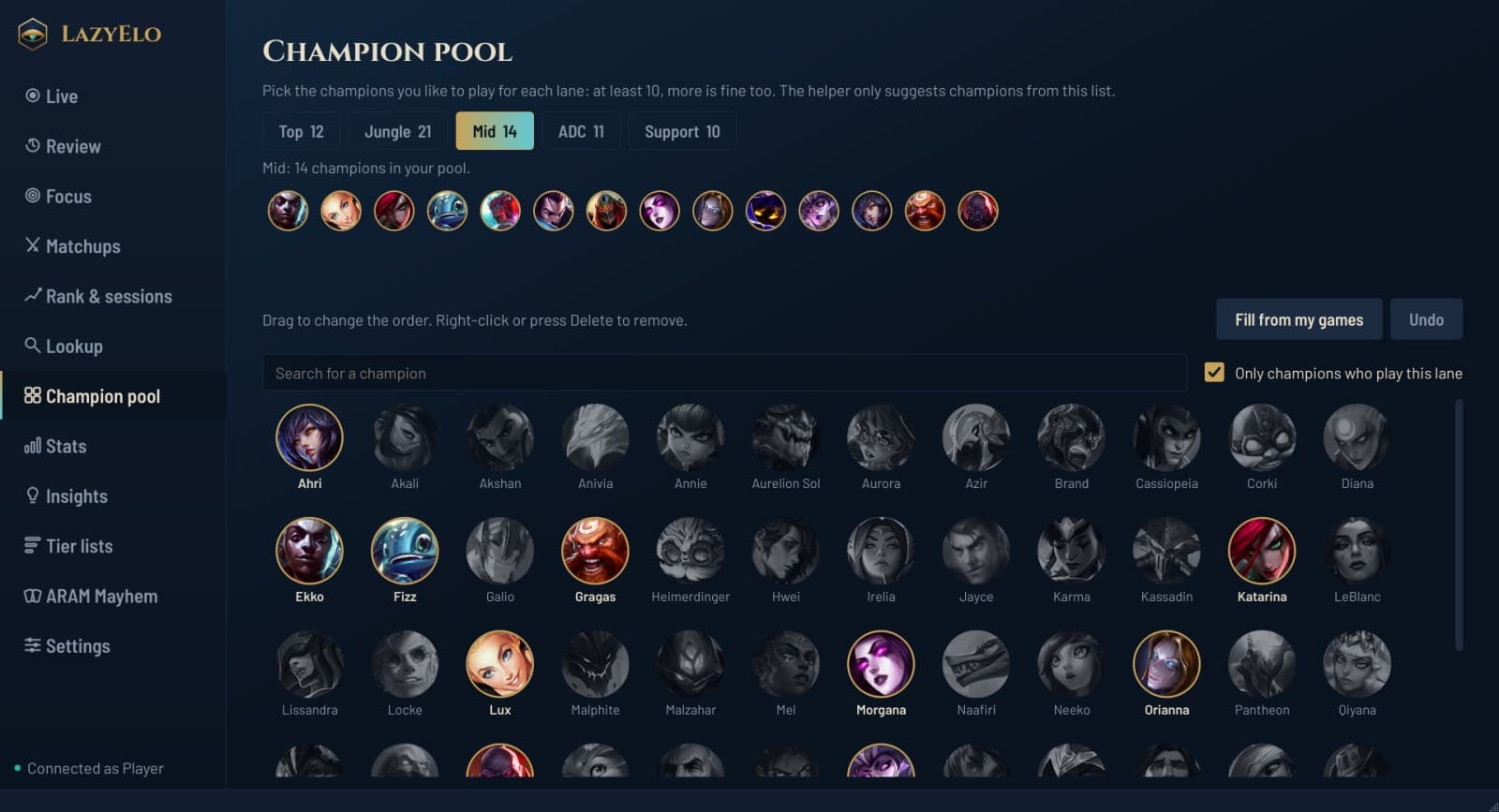
Champion pool: at least 10 champions per lane. Champ select only ever suggests champions from this list. Champ select opens
LazyElo reads your assigned lane from the client. When there is none, one click on the lane buttons sets it, and LazyElo remembers your last lane.It scores your pool against the draft
Banned and picked champions drop out. For each of the others it weighs your own win rate on the champion, the champion's win rate in this lane in the games LazyElo has collected, how it does against the enemies already locked in, how it pairs with your locked teammates, how much you've played it lately, what your team is missing (magic damage, a frontline, engage) and how risky it is as a blind pick while your opponent is unknown. The sum reads as an estimated win chance.It learns what matters for you
Every finished champ select is saved with the result of the game. After each sync LazyElo refits how much each factor counts, starting from set defaults, so over time it learns whether comfort, the counter or team fit matters most for you.You see the best pick and why
The top pick gets the big card, with its estimated win chance and reasons in plain words, such as “Good combo with Hwei (57% in 30 games)” or “Risky as a blind pick (has clear counters)”. Two more picks sit below it, then the rest of your pool with their chances, and your build for the champion.It asks for your plan in lane
Once you hover or lock a champion and LazyElo can tell which enemy most likely plays your lane, a card asks: what is your plan against them? You type one sentence first. Then you can open your notes on that matchup and your record in it. If the guess is less certain, the card says the enemy probably plays your lane.You pick and lock in
LazyElo never hovers, picks, bans or locks anything, and it never imports runes or builds. It only helps you choose.
Matchups: your own notes per matchup
Three short fields
My lane plan, What I watch for, and What worked / what didn't. Everything saves as you type, only on this computer.Your record next to it
Games, wins and losses, when you last played the matchup and your average KDA in it, plus your CS and gold difference at 10 minutes from the games with a timeline.How others did
How other players in your stored games did in the same matchup, with the number of games, so you can see when it is only a rough guide.Where to start
A list of matchups you play often but have no note for yet.An AI tip, if you ask
Three short tips from general League knowledge, without numbers: those come from your own games. AI is included in Pro, or works on Plus with your own Anthropic or OpenAI key.
Why it asks for your plan first
Thinking of your plan before you read your notes is a small self-test, and that makes the plan stick better than reading the notes first. So in champ select the card asks, and only then shows what you wrote.
The card shows only static information from before the game: what you wrote between games and your record in the matchup.
Not sure who beats whom? The LoL counters pages list each champion's hardest matchups per lane, from ranked games at LazyElo players' elo.
Who it's for
Players with a small pool
You want to know which of your own champions fits this draft, not which champion is strongest in the world.Players who blind pick a lot
You get a warning when a pick has clear counters, and a nudge toward a safer one from your pool.Players who keep losing the same lane
You walk into the matchup with a plan you wrote yourself, and your record shows whether it is working.Not for you if
you want runes and builds imported into the client. LazyElo shows your build; you set it yourself.
Free or Plus
The free plan shows the best 3 picks from your pool, without the reasons, and has the champion pool and the tier lists. Plus (€4.99 a month or €39 a year) adds the reasons, the rest of your pool with their chances and Matchups. Every new account gets 7 days of Plus free, without a payment card.
The loop between games
Four pages in the app that feed each other. A death in Review becomes a plan in Focus, your plan per opponent waits in Matchups, and Rank & sessions shows whether your LP moves. Then the next game goes back to Review.
Step 1
ReviewEach death on the map, three questions, one plan.
Step 2
FocusOne if-then plan per role, measured for 15 games.
Step 3
Matchups (this page)
Your own plan per opponent, asked in champ select.
Step 4, then back to 1
Rank & sessionsYour LP per game and per session.
Questions and answers
What champion should I play?
What determines a counter pick?
What's the best drafting tool for League?
How many champions should be in my pool?
Does it work in ranked?
Is the champ select helper free?
Get a pick from your own pool in your next champ select
Install LazyElo, make a free account and open the League client. The champion pool fills itself from your games, and champ select shows your best pick from the first draft.
Free plan, no ads. For Windows 10 and 11.
Related
- Are LoL apps safe?
Overwolf, Porofessor, Blitz and Riot's 2026 rules.
- Best LoL overlay
In-game overlays compared, with and without Overwolf.
- OP.GG alternative
Stats sites, and the OP.GG desktop app next to LazyElo.
- Game review and AI coach
Every death, three questions, one if-then plan.
- LP tracker
Your LP per game and per session, from day one.
- LoL counters
Each champion's hardest matchups per lane.
- How to climb in League
Solo queue habits that work.
- All features
What LazyElo does before, during and after a game.
- Compare League apps
LazyElo next to Porofessor, Mobalytics, Blitz and U.GG.